๐Ÿฆž

ClawCrew

A framework for building collaborative AI agent teams on OpenClaw

What is ClawCrew?

ClawCrew is a framework for creating multi-agent teams that collaborate on tasks. Instead of one AI doing everything, you define specialized agents with focused roles, and an orchestrator coordinates their work.

๐Ÿงฌ

Each Agent Evolves

Train and tune each agent's capabilities separately โ€” refine the designer's taste, sharpen the coder's style, improve the tester's coverage.

๐Ÿ‘”

You're the Manager

In Telegram, talk to the orchestrator and watch every agent work in real-time. Jump in anytime โ€” give feedback, correct course, or let them run.

โœจ

Workspace = Capability

Each agent's capabilities are defined by its workspace โ€” SOUL.md, skills, and tools. Change the workspace, change the agent.
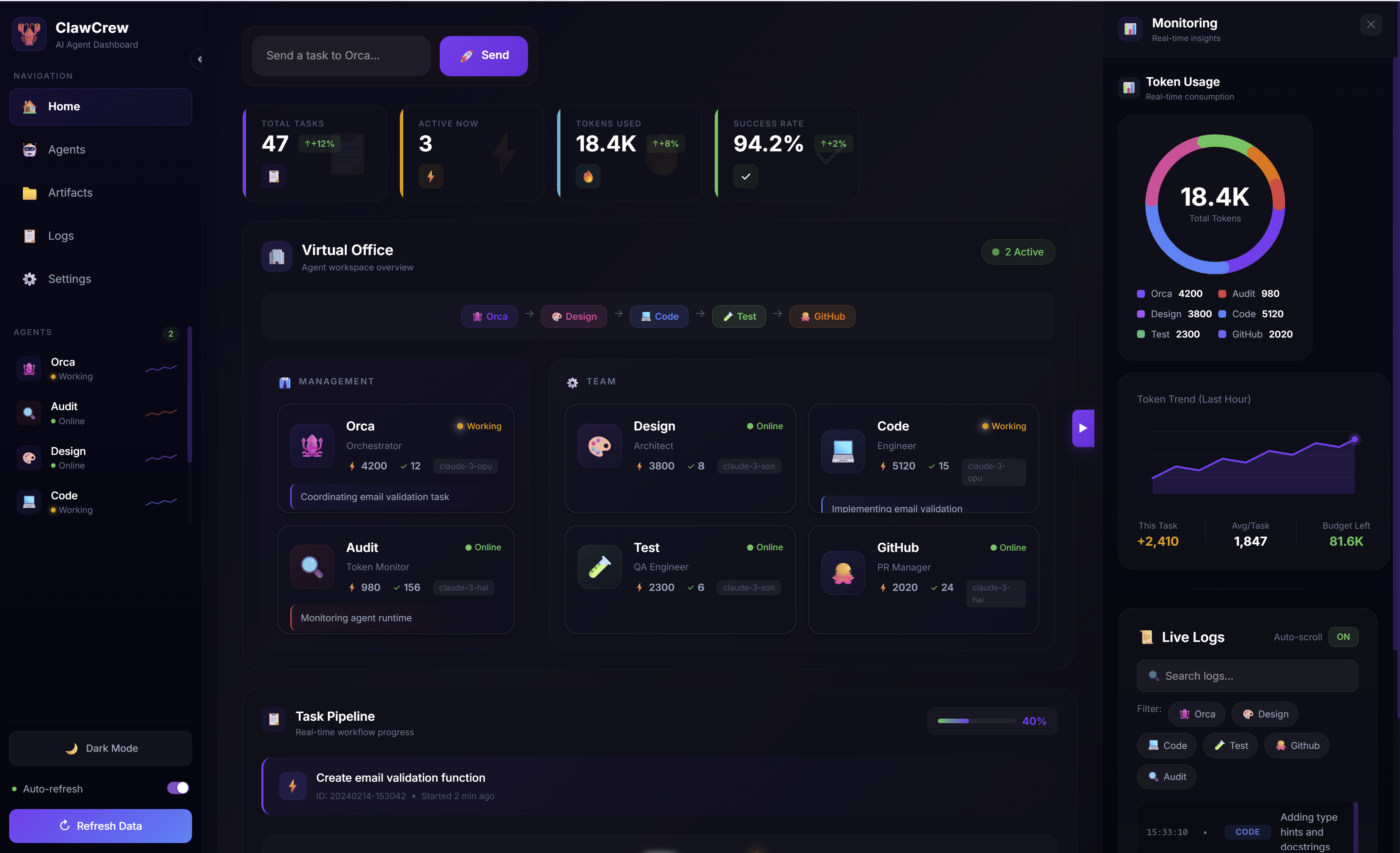
ClawCrew Dashboard

Core Concept

โ”Œโ”€โ”€โ”€โ”€โ”€โ”€โ”€โ”€โ”€โ”€โ”€โ”€โ”€โ”€โ”€โ”€โ”€โ”€โ”€โ”€โ”€โ”€โ”€โ”€โ”€โ”€โ”€โ”€โ”€โ”€โ”€โ”€โ”€โ”€โ”€โ”€โ”€โ”€โ”€โ”€โ”€โ”€โ”€โ”€โ”€โ”€โ”€โ”€โ”€โ”€โ”€โ”€โ”€โ”€โ”€โ”€โ”€โ”€โ”€โ”€โ”€โ”€โ” โ”‚ ClawCrew Framework โ”‚ โ”œโ”€โ”€โ”€โ”€โ”€โ”€โ”€โ”€โ”€โ”€โ”€โ”€โ”€โ”€โ”€โ”€โ”€โ”€โ”€โ”€โ”€โ”€โ”€โ”€โ”€โ”€โ”€โ”€โ”€โ”€โ”€โ”€โ”€โ”€โ”€โ”€โ”€โ”€โ”€โ”€โ”€โ”€โ”€โ”€โ”€โ”€โ”€โ”€โ”€โ”€โ”€โ”€โ”€โ”€โ”€โ”€โ”€โ”€โ”€โ”€โ”€โ”€โ”ค โ”‚ โ”‚ โ”‚ Orchestrator Agent (workspace_orca/) โ”‚ โ”‚ โ”œโ”€โ”€ SOUL.md โ†’ Personality & rules โ”‚ โ”‚ โ”œโ”€โ”€ AGENTS.md โ†’ Behavior guidelines โ”‚ โ”‚ โ””โ”€โ”€ skills/ โ†’ Available capabilities โ”‚ โ”‚ โ”‚ โ”‚ โ”‚ spawns โ”‚ โ”‚ โ–ผ โ”‚ โ”‚ โ”Œโ”€โ”€โ”€โ”€โ”€โ”€โ”€โ”€โ”€โ”€โ”€โ”€โ”€โ”€โ” โ”Œโ”€โ”€โ”€โ”€โ”€โ”€โ”€โ”€โ”€โ”€โ”€โ”€โ”€โ”€โ” โ”Œโ”€โ”€โ”€โ”€โ”€โ”€โ”€โ”€โ”€โ”€โ”€โ”€โ”€โ”€โ” โ”‚ โ”‚ โ”‚ Agent A โ”‚ โ”‚ Agent B โ”‚ โ”‚ Agent C โ”‚ โ”‚ โ”‚ โ”‚ workspace_A/ โ”‚ โ”‚ workspace_B/ โ”‚ โ”‚ workspace_C/ โ”‚ โ”‚ โ”‚ โ””โ”€โ”€โ”€โ”€โ”€โ”€โ”€โ”€โ”€โ”€โ”€โ”€โ”€โ”€โ”˜ โ””โ”€โ”€โ”€โ”€โ”€โ”€โ”€โ”€โ”€โ”€โ”€โ”€โ”€โ”€โ”˜ โ””โ”€โ”€โ”€โ”€โ”€โ”€โ”€โ”€โ”€โ”€โ”€โ”€โ”€โ”€โ”˜ โ”‚ โ”‚ โ”‚ โ”‚ Each agent = unique workspace = unique capabilities โ”‚ โ”‚ โ”‚ โ””โ”€โ”€โ”€โ”€โ”€โ”€โ”€โ”€โ”€โ”€โ”€โ”€โ”€โ”€โ”€โ”€โ”€โ”€โ”€โ”€โ”€โ”€โ”€โ”€โ”€โ”€โ”€โ”€โ”€โ”€โ”€โ”€โ”€โ”€โ”€โ”€โ”€โ”€โ”€โ”€โ”€โ”€โ”€โ”€โ”€โ”€โ”€โ”€โ”€โ”€โ”€โ”€โ”€โ”€โ”€โ”€โ”€โ”€โ”€โ”€โ”€โ”€โ”˜

Example Teams

๐Ÿ’ป Software Dev Team

๐Ÿฆ‘ OrcaBot (Orchestrator) โ”œโ”€โ”€ ๐ŸŽจ DesignBot โ†’ API design, specs โ”œโ”€โ”€ ๐Ÿ’ป CodeBot โ†’ Implementation โ””โ”€โ”€ ๐Ÿงช TestBot โ†’ Testing, coverage

Automated code generation with quality gates

๐Ÿ“š Research Team

๐Ÿ“š ResearchLead (Orchestrator) โ”œโ”€โ”€ ๐Ÿ” SearchBot โ†’ Web research โ”œโ”€โ”€ ๐Ÿ“Š AnalystBot โ†’ Data analysis โ””โ”€โ”€ โœ๏ธ WriterBot โ†’ Report writing

Deep research with structured output

๐ŸŽฌ Content Team

๐ŸŽฌ ContentLead (Orchestrator) โ”œโ”€โ”€ ๐Ÿ’ก IdeaBot โ†’ Brainstorming โ”œโ”€โ”€ โœ๏ธ DraftBot โ†’ Writing drafts โ””โ”€โ”€ ๐Ÿ” EditorBot โ†’ Review, polish

Blog posts, marketing copy, documentation

๐ŸŽฏ Support Team

๐ŸŽฏ SupportLead (Orchestrator) โ”œโ”€โ”€ ๐Ÿ” TriageBot โ†’ Categorize issues โ”œโ”€โ”€ ๐Ÿ’ฌ ReplyBot โ†’ Draft responses โ””โ”€โ”€ ๐Ÿ“ˆ EscalateBot โ†’ Complex handling

Automated support ticket handling

Software Dev Team

The included example shows a complete software development crew with design, implementation, and testing phases.

Agent Role Deliverables
๐Ÿฆ‘ OrcaBot Orchestrator Task breakdown, quality gates, final delivery
๐ŸŽจ DesignBot Architect API specs, types, edge cases
๐Ÿ’ป CodeBot Engineer Implementation, docstrings
๐Ÿงช TestBot QA Unit tests, coverage report
1

Design Phase

OrcaBot spawns DesignBot โ†’ API spec created โ†’ OrcaBot reviews โœ…

2

Code Phase

OrcaBot spawns CodeBot โ†’ Module implemented โ†’ OrcaBot reviews โœ…

3

Test Phase

OrcaBot spawns TestBot โ†’ Tests written & run โ†’ OrcaBot reviews โœ…

4

Final Delivery ๐Ÿš€

Code + Tests + Documentation delivered with full coverage

Getting Started

Prerequisites: OpenClaw installed and configured. See OpenClaw docs.

โšก

One-Click Install

curl -sSL https://raw.githubusercontent.com/lanxindeng8/clawcrew/main/install.sh | bash

Auto-detects OS, installs dependencies, runs setup wizard.

๐Ÿ“ฆ

Install via pip

pip install clawcrew

Standard Python package installation.

๐Ÿณ

Docker

git clone https://github.com/lanxindeng8/clawcrew cd clawcrew cp .env.example .env docker-compose up -d

After Installation

# 1. Reload your shell (or restart terminal) source ~/.profile # or ~/.zshrc depending on your shell # 2. Configure ClawCrew (Telegram bot, OpenClaw settings) clawcrew init # 3. Start the system clawcrew start # 4. Verify everything is running clawcrew status

Send a Task

Telegram: Send a message in your Telegram group:

Create a Python module to calculate distance between two points

CLI: Chain multiple agents with automatic context passing:

clawcrew chain "Create a distance calculator module" design code test

OrcaBot will coordinate DesignBot โ†’ CodeBot โ†’ TestBot to complete the task.

CLI Reference

Command Description
clawcrew init Interactive setup wizard
clawcrew start / stop / status Manage the OpenClaw gateway
clawcrew run <agent> -t "task" Run a single agent
clawcrew chain "task" design code test Chain multiple agents with auto context passing
clawcrew agents List available agents
clawcrew github analyze --url <repo> Analyze a GitHub repository

Roadmap

โœ…

v0.3 - Current

PyPI package, CLI tools, GitHub integration, Docker deployment, Repo Mode workflows, Dashboard

๐Ÿ”„

v0.4 - In Progress

Easy onboarding, Role templates, Shared context, Team memory, Workflow editor

๐Ÿ”ฎ

Future

Multi-team communication, Code review workflows, CI/CD hooks, Organization policies

Recent Updates

NEW Phase 4: Installation & DX

PyPI Package โ€” Install with pip install clawcrew

One-Click Install โ€” Single curl command setup

Chain Command โ€” Run multiple agents with auto context passing

Docker Support โ€” Full containerized deployment

v0.2 Phase 3: Repo Mode

Repo Mode โ€” Work with external GitHub repositories using Unified Diff patches

GitHub Integration โ€” Analyze repos, manage issues, create PRs

Multi-Model Design โ€” Design with multiple AI models, synthesize results

View full changelog โ†’